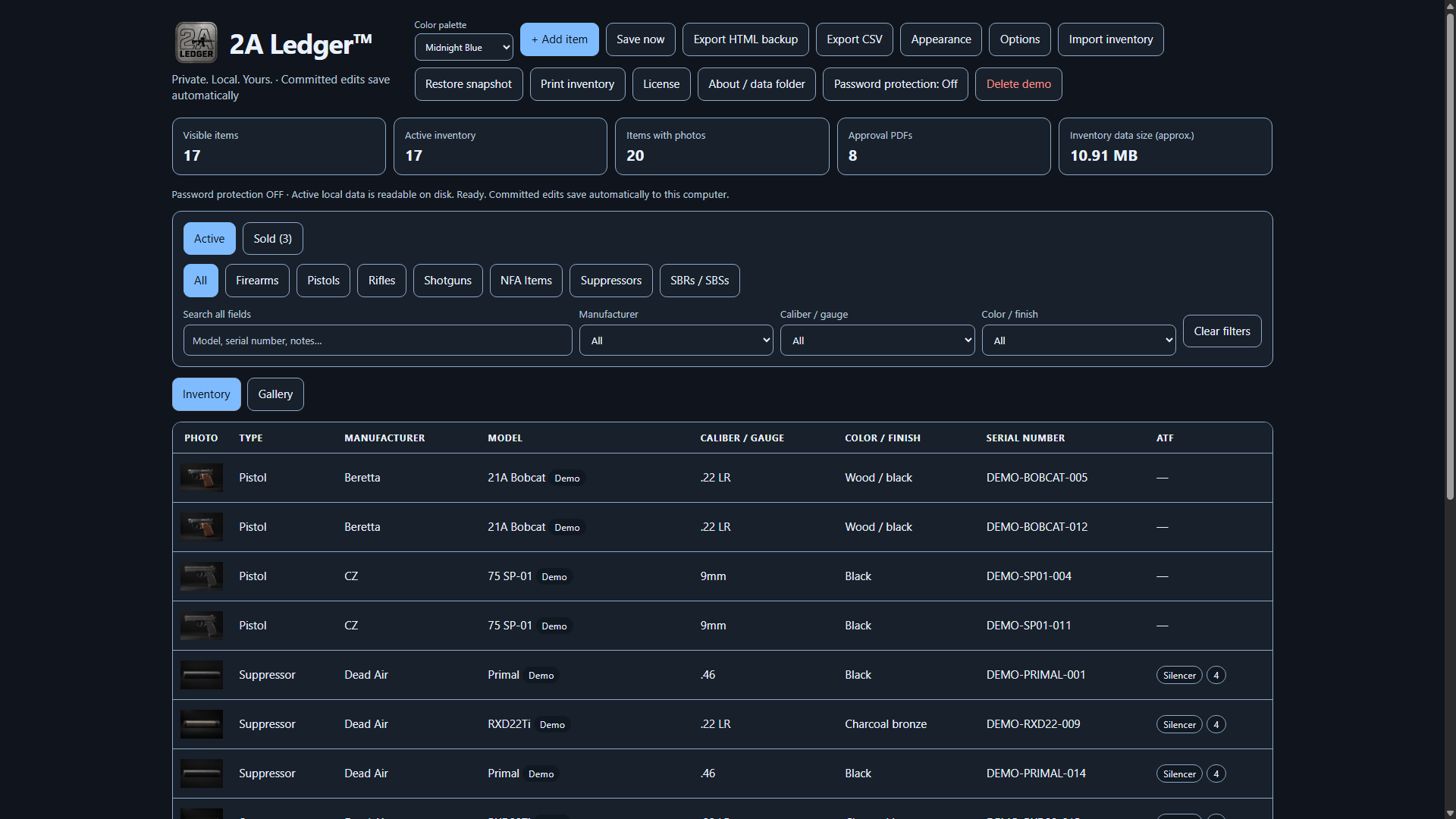
Why keep a firearm inventory? Because the details are hardest to gather when the firearm is missing, damaged or someone else has to identify it. A personal inventory keeps serial numbers, photos and history ready. 2A Ledger™ brings those records together in a searchable desktop application.
Have one firearm? Start there. Its serial number and history are worth recording, even if you never add a second.
01—03 / When something goes wrong
Less guessing. Better information.
Prepare now for the questions you hope you never have to answer.
“What was the serial number?”
You discover a burglary. You know which firearm is missing. Can you give police its exact identifying details?
Have the make, model, type, caliber or gauge, serial number and distinctive markings ready. Photos and purchase information can add context. Police will also ask about you and the incident—when, where and what happened.
Find the item, review its saved photos and print its record. You have information recorded while the firearm was still in your possession.
What belongs in the report—and where can I record it?
| Information to have | 2A Ledger provision |
|---|---|
| Make, model, type, caliber/gauge, serial | Core inventory fields. |
| Color, finish, distinctive marks and accessories | Color/finish, photos and notes. |
| Clear views of the actual item and markings | Multiple local photos. |
| Acquisition date and original price | Acquisition and purchase details. Current value is a separate figure. |
| Importer, seller/source and ownership documents | Use notes for details without a dedicated field. Retain genuine documents; a readable receipt photo can accompany the item. |
| Contact details, incident time/location, circumstances, witnesses, case number | Provide these separately to police. The program does not submit a report. |
Keep in mind: Report a theft promptly to local police and follow applicable deadlines. Washington, for example, generally requires reporting within 24 hours of discovery. Registered NFA firearms also require an immediate report to ATF. An inventory entry does not notify either agency.
Read more: ATF Personal Firearms Record (PDF) · Example police reporting form
“Can you show that it belongs to you?”
Police recover a firearm that matches yours. Reporting it missing and getting it released are two different steps.
Photos, matching serial numbers and acquisition records can support an ownership claim. Keep genuine receipts, transfer papers or estate documents, too. Marietta Police accepts an original receipt or other ownership documentation; Reno Police lists purchase paperwork and family wills or probate orders among possible evidence.
Bring an organized item record to the conversation, with identifying details and references to your supporting documents.
Keep in mind: A self-created inventory is supporting information, not guaranteed proof of title. Ask the agency what it accepts; identification, eligibility checks and release approval may still be required.
“What was lost—and what was it worth?”
After a theft or fire, an adjuster asks for an itemized list. Memory is a difficult place to start.
Descriptions, photos and purchase details help you explain what you owned before the loss. The NAIC recommends documenting belongings, including guns. California’s insurance department also notes that photos help when receipts are unavailable.
Prepare a list of affected items and their details. Before anything happens, use those records to discuss your collection and coverage with your insurer. Include optics and other accessories in your notes and photos.
Keep in mind: Documentation does not create coverage or guarantee payment. Check firearm limits, deductibles and exclusions. Keep current valuations separately from original purchase prices—and a backup away from the location at risk.
Coverage example: State Farm homeowners coverage.
04—05 / For the people who come after you
Keep the story with the firearm.
The history you know by heart may be information your family has never heard.
“That was Grandpa’s old 12-gauge.”
There is no store receipt. There is a family story—and only a few people still know it.
Record who it came from, how it came to you and what is known about its history. Add clear photos and references to available gift or estate papers. Mark uncertain dates as approximate and unknown prices as unknown.
Keep the story in the item’s notes alongside its photos and identifying details. Preserve both what it is and why it matters.
Example note: “Inherited from my grandfather through his estate, around 2018. Original purchase date and price unknown. Estate papers retained with family records.”
Keep in mind: A receipt is not the only possible supporting document; Reno’s policy includes wills and probate orders. A family story alone does not settle legal ownership or complete a transfer. Record actual markings—even if an older firearm has no serial—and never invent missing details.
“Would my family know where to start?”
A spouse or executor may need to identify a collection they have never managed.
A photo, description and storage location give them a starting point. Related records can help them locate approval documents and understand which items have special history. Estate values may differ from purchase prices; South Carolina’s inventory form (PDF) lists guns among personal property and uses date-of-death values.
Leave a collection your authorized representative can identify. Arrange a secure, lawful way for that person to find the records, backups and required password.
Keep in mind: Inventory notes do not replace a will or authorize a transfer. Individually registered NFA firearms in an estate have separate procedures; trust-owned property may differ.
06—08 / Useful in everyday ownership
Less hunting for paperwork.
Make the details easier to find whenever a question comes up.
“I sold that years ago.”
You remember the sale. Do you still have the date and transaction details?
Keeping an item’s history after a sale helps explain when it left your possession. The ATF’s personal record form includes who an item was sold or transferred to and when.
Keep Sold records separate from your active collection. Preserve sale history, add relevant transaction references and retain genuine transfer paperwork.
Keep in mind: Records do not establish that every transfer requirement was met or eliminate liability. Protect buyer information; enable password protection before storing sensitive details. This personal inventory is not a substitute for required licensed-dealer records.
Workflow: Customer guide: records, protection and sale history.
“Which approval goes with this one?”
Several items have similar paperwork. You need the issued document for this specific serial number.
For items regulated under the National Firearms Act (NFA), keep genuine registration evidence with the matching record. Federal rules require retaining proof of registration and making it available to an ATF officer on request.
Associate ATF classifications and Form entries with the item, and keep supporting approval PDFs attached to its record.
Keep in mind: A Form badge or typed entry is not an approval. Keep the genuine issued document. The program does not register firearms, complete transfers or determine legal status.
“Does this recall apply to mine?”
A manufacturer posts a notice—or asks for the serial number of a firearm already away for service.
Use the exact model and serial to check the manufacturer’s current guidance. For example, Ruger’s Mark IV recall uses identifying details, and its service instructions tell owners to retain the serial for later inquiries.
Find the identifying details, keep service dates and reference numbers in notes, and save photos of condition and included accessories before service.
Keep in mind: Check recalls yourself; this is not an automatic alert service. Follow the manufacturer’s instructions and retain any receipt needed for warranty service.
09—10 / Keep track through change
Know what moved. Keep what matters.
Records should remain useful when your storage—or your computer—changes.
“Did everything make it to the new place?”
A house move or a new safe leaves you wondering what is where.
Compare a list with the physical items before and after the move. Check serials and condition, then update storage locations. This applies the same basic inventory-checking principle in the FMCSA moving checklist.
Print a list, check each item and keep its new location with its record. A change of storage stays separate from a sale.
Keep in mind: Confirm transport, shipment, possession and any NFA requirements before moving firearms. A location entry does not grant permission for any of those activities.
“What if I lose the computer, too?”
The inventory is on a computer that fails—or disappears in the same burglary.
Local storage gives you control. A separate backup helps the records survive the loss of that computer. Keep a recent protected copy on an independent drive in a different secure location.
Save a protected .flvault backup and test restoration in a separate test copy using the customer guide. Check the restored records and attachments.
Keep in mind: Backups need your action. Keep the password used to create each backup; support cannot recover it. Same-computer snapshots, CSV files and readable HTML exports are not substitutes for a complete independent protected backup. Printed and exported copies need their own protection.
Read more: NAIC inventory guidance · 2A Ledger privacy notice.
Why use 2A Ledger?
A spreadsheet can keep a list.
2A Ledger keeps the record together.
Explore the complete features or use the free inventory checklist before choosing software.
A paper list or spreadsheet is a valid start. Choose 2A Ledger when you want a ready-made place for the details, photos and history—without designing and maintaining that system yourself.
Find the particular item.
Search details and review Inventory or Gallery, with your chosen display photo.
Keep its history close.
Connect identifying details, notes, photos, sale history and applicable approval PDFs.
Prepare a usable copy.
Choose print columns and export records. Check what is included before sharing.
Choose who sees it.
Your inventory stays local. Use optional password protection and separate protected backups.
You are paying for organization and convenience. The value still depends on the accuracy of what you enter and the backups you keep. See the documented features →
Clear answers before you buy
A few things worth knowing.
Do I need a receipt to report a stolen firearm?
Contact local law enforcement promptly and provide the details and evidence you have. Do not delay contacting police while searching for a receipt. Requirements depend on the agency. Reporting a theft and proving entitlement to receive a recovered firearm are separate steps. Read ATF guidance for private owners.
Will a printed inventory prove ownership?
It can support identification and your account of ownership, but it is not guaranteed to satisfy police, an insurer or a court. Keep genuine receipts, transfer or estate documents and ask the relevant agency what it accepts. An inventory does not guarantee recovery or an insurance payout.
What if I inherited a firearm without a receipt?
Save photos, actual identifying markings and an honest account of how it came to you. Keep available gift, will or probate documents. Mark uncertain information clearly; receiving it without paying does not mean its current value is zero. See the heirloom example.
What does the $14.99 one-time purchase include?
The current introductory offer covers the initial version on one active Windows computer, with no subscription. Bug and security fixes released for that purchased initial version are included. Version or feature upgrades require a new license at the then-listed upgraded-version price. Read the license terms.
Does my collection get uploaded to the cloud?
2A Ledger does not upload your inventory, photos, documents or inventory password to its licensing service. Purchases and licensing use online services and exchange payment, license and device information. Files you choose to share, export or put in a synced folder remain under your control. Read the privacy notice.
Can I use it offline?
You do not need a continuous internet connection, but activation and periodic license checks require one. If the licensing certificate expires beyond its grace period, editing becomes read-only until licensing is restored; licensing does not delete your inventory. See the current renewal and offline-use instructions.
Can I print photos, receipts and every attachment together?
You can print firearm records and choose print columns. Review a sample before relying on it: do not assume every photo or attachment is automatically included. Keep genuine supporting documents available separately. The published features verify approval PDF attachments; they do not establish a dedicated all-in-one ownership packet.
What if I cannot install or activate it?
Contact support within 7 days of purchase. Under the published policy, if the installation or activation problem cannot be resolved, your purchase will be refunded. This is not a general free trial. Read the refund policy or contact support.
Make the first record useful
Start with one firearm.
- Identify it. Verify make, model, type, caliber or gauge and serial against the actual item.
- Photograph it. Include the whole item, readable markings and important accessories.
- Record its history. Add acquisition details, storage location and what is known about its past.
- Keep the evidence. Retain receipts, transfer or estate papers, approvals and any separate valuation.
- Make it recoverable. Review a printout, save a protected backup separately and test a restore. Update records after purchases, sales and changes.
Choose password protection before adding sensitive information. Follow the customer guide →
The facts behind the scenarios
Sources you can check.
Reviewed October 8, 2026. Agency policies below are local examples, not nationwide rules. Confirm current requirements with the relevant agency, insurer or manufacturer. These sources explain the recordkeeping need; they do not endorse 2A Ledger.
Open the complete source list
Product and purchase
Theft and recovery
Insurance and estates
Private. Local. Yours.
You have taken care of the collection.
Now take care of its records.
Keep the details you know today ready for the day someone asks.
$14.99 USD · one-time purchase
Initial version · one active Windows computer · no subscription. Internet required for activation and periodic license checks. Bug and security fixes released for the purchased initial version are included. Version or feature upgrades require a new license at the then-listed upgraded-version price.
Independent recordkeeping software from YourEMR LLC. Not affiliated with the ATF. This page provides general information, not legal or insurance advice. The program does not file reports, establish title, guarantee coverage or replace official documents.